 Contact
  Calendars
 Careers
 Engage
  District

Digital Learning & Innovation
Intentional. Inclusive. Future-Ready.
The Office of Digital Learning and Innovation advances student success through the purposeful use of technology, promotes equitable access to digital tools, and supports the development of skills that help learners lead, learn, and grow in a connected world.
APS is cultivating a learning community where students are empowered to navigate technology with confidence and care, educators are supported to deliver meaningful instruction, and families are engaged as partners in the process. While technology is an integral part of today’s world, it is just one tool in a teacher’s rich toolkit—complementing hands-on, collaborative, and creative learning experiences. As technology evolves, our shared commitment to innovation, intentional practices, and safe, balanced digital learning continues to grow.
Arlington Public Schools is committed to transparency, inclusion, and thoughtful integration of technology across academic, social, and digital spaces.



Instructional Technology Coordinators
ITC Description
Instructional Technology Coordinators (ITCs) are school-based educators who specialize in integrating technology into teaching and learning. They collaborate with teachers to design meaningful digital learning experiences and provide ongoing support to staff and students throughout the year.
ITCs are also a key point of contact for families with questions about how technology is used in their child’s school. As experts in instructional technology, they help make sure digital tools are used thoughtfully to support student growth, creativity, and connection.
Elementary ITCs by Schools (A-G)
| School | Name |
| Abingdon | Rebecca Madrona |
| A.W. Fleet | Ashley Snyder |
| ASF | John Foley |
| Ashlawn | Leslie Martin |
| ATS | Marie Hone |
| Barcroft | Lauren Koehler-Lee |
| Barrett | Jacqueline Moody |
| Campbell | Samuel Wightman |
| Cardinal | Beth Hooser |
| Carlin Springs | Stephen Shields |
| Claremont | Andrea Fitch |
| Discovery | Irene Bal |
| Dr. Charles R. Drew | Michelle Young-Hasberry |
| Escuela Key | Paul Maniscalco |
| Glebe | Kate Neal |
Elementary ITCs by Schools (H-Z)
| School | Name |
| Hoffman-Boston | Emily Bye |
| Innovation | Melissa Hyatt |
| Jamestown | Kelly Barrett |
| Long Branch | Amy Burd |
| Montessori | Renee Shaw |
| Nottingham | Lori Mintzer |
| Oakridge | Sean Jones |
| Randolph | Cathy Wague |
| Taylor | Stephanie Lin |
| Tuckahoe | Alexandra Dolinsky |
Middle School ITCs by School
| School | Name |
| Dorothy Hamm | Joel Gildea |
| Gunston | Rayla Parquet |
| H-B Woodlawn – Shriver | Kathy Gust |
| Jefferson | Tammy Mills-Mirick |
| Kenmore | Michael Goodman |
| Swanson | Samarra Esteve |
| Williamsburg | Christine Stokes-Beverley |
High School ITCs by School
| School | Name |
| REEP (Adult) | Michele Cona |
| Arlington Com – Langston – New Directions | Patrick Tien |
| Arlington Tech | Steven Jones |
| Career Center | Charles Randolph |
| H-B Woodlawn – Shriver | Kathy Gust |
| Wakefield | Alicia Cordero |
| Wakefield | Rebecca Chervin |
| Washington Liberty | Jeanine Osther |
| Washington Liberty | Rosa Navas |
| Yorktown | Aysia Moten |
| Yorktown | Brent Opperhauser |
Meet Our APS Apple Leadership Team
Apple Distinguished Educators at APS
APS is happy to announce that Michael Goodman and Charles Randolph have been selected as Apple Distinguished Educators (ADEs)! This international recognition honors innovative educators who transform teaching and learning through creativity, leadership, and the effective use of technology.
The ADE program celebrates a global community of education leaders who leverage Apple technology to empower learners, support educators, and create inclusive, future-ready learning environments.
🍎 Learn more about applying to become an Apple Distinguished Educator for 2026
Apple Learning Coaches at APS
Arlington Public Schools is growing their leadership capacity with certified Apple Learning Coaches within the Digital Learning team (with more on the way!).
- Charles Randolph
- Christine Stokes-Beverley
- Emily Bye
- Jacqueline Firster
- Kathy Gust
- Kelly Barrett
- Michael Goodman
- Renee Shaw
- Steven Jones
These coaches bring specialized training in instructional coaching and digital learning, and they are available to support the Instructional Technology Coordinator group across the district.
They offer:
- 1:1 and small group coaching for teachers and staff.
- Instructional planning support using Apple tools like FreeForm, Clips, iMovie, Swift Playground, Pages, GarageBand, and Apple Classroom.
- Monthly Tech Talks and Canvas-based PD modules focused on student-centered learning.
- Their work aligns with district goals for instructional transformation, digital equity, and active learning.
📌 This Year’s Focus
-
- Expand coaching access to more schools through virtual and in-person sessions.
- Build a sustainable onboarding model for new ITCs that includes Apple Teacher and Apple Learning Coach certification.
- Align coaching cycles with district goals for instructional transformation and digital equity.
Start Your Apple Learning Journey
APS encourages all teachers and school staff to begin their Apple learning journey by becoming an Apple Teacher—a free, self-paced professional learning program designed to build foundational skills in using Apple products for teaching and learning.
🍎 Become an Apple Teacher
- Visit appleteacher.apple.com to complete interactive tutorials and earn badges for iPad and Mac apps like Pages, Keynote, Numbers, GarageBand, and iMovie.
- Once you earn all six badges for either iPad or Mac, you’ll be recognized as an official Apple Teacher.
- You can also build your Apple Teacher Portfolio to showcase creative lesson design and integration strategies.
🍏 Free Apple Professional Learning Resources
🍎 Apple Professional Learning Live
- Free, hands-on virtual sessions for educators at all levels—from elementary to high school, beginner to expert.
- Each session includes practical tips, curriculum integration, and verification of attendance for professional growth.
🍏 APL Virtual Coaching Sessions
- Personalized coaching from Apple Professional Learning Specialists.
- Includes self-paced lessons, facilitation guides, and two days of virtual workshops.
- Designed to help educators bridge the gap between technology and curriculum and tailor professional learning to school needs.
🍎 Apple Education Community
- A collaborative hub for educators to access lesson templates, tutorials, and forums.
- Connect with peers, share successes, and explore hundreds of resources to support your practice
APS Pillars of Digital Learning
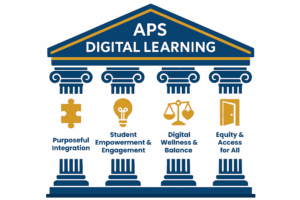
The Pillars of Digital Learning represent the foundational beliefs that shape how we integrate instructional technology across APS. These pillars guide our practices to be equitable, student-centered, and aligned with both the APS Strategic Plan, Virginia Department of Education guidance, and the ISTE Standards for Students and Educators.


Pillar 1
“Purposeful Integration”
Description:
Technology is integrated with intention to create more rigorous instruction, deepen learning, and support individualized academic goals—not just added for convenience or used when it no longer serves student outcomes.

Pillar 2
“Student Empowerment & Expression”
Description:
Digital tools give students voice and choice, encouraging creativity, collaboration, and authentic expression across all content areas.

Pillar 3
“Digital Wellness & Balance”
Description:
APS promotes healthy digital habits, screen time awareness, and safe online behavior to support students’ social, emotional, and academic well-being. Instructional Technology Coordinators, in collaboration with other departments, teach digital citizenship to promote respectful, responsible, and thoughtful online behavior—whether students are using APS-managed devices at school or independently.

Pillar 4
“Equity & Access for All”
Description:
Every student deserves access to high-quality digital tools and learning experiences, regardless of background, ability, or circumstance.
Quick Link
Contact
Families are encouraged to contact their school’s Instructional Technology Coordinator and/or Principal for specific information about their child’s school.
Jacqueline Firster, Supervisor of Digital Learning & Innovation
Office of Academics